にほんのかおもじ (facemark) です。
1. ~~~ヾ(^∇^)
2. m(._.)m
3. (;_・)
こたえ(answer)は:
http://club.pep.ne.jp/~hiroette/en/facemarks/body.html
Thursday, September 30, 2010

Tuesday, September 28, 2010
Wednesday, September 22, 2010
How to use Google Docs
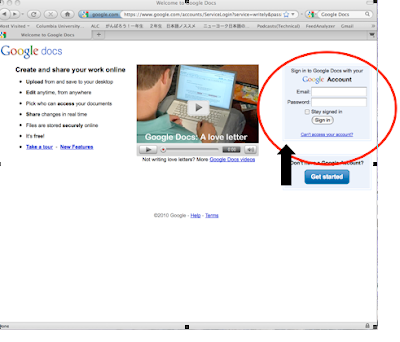
1. Access GOOGLE DOCS.
(http://docs.google.com)
On the login page, type in your gmail address and password.
2. Click on "Create New" on the upper left-hand side of the screen.
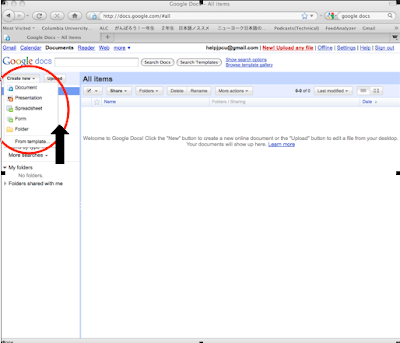
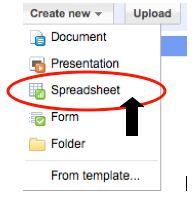
Click on "Spreadsheet" under the "Create New" menu.
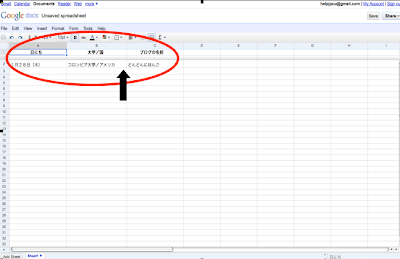
3. Using the spreadsheet, make a comment sheet as shown below.

4. Next, click on "File" on the upper left-hand side, and save.
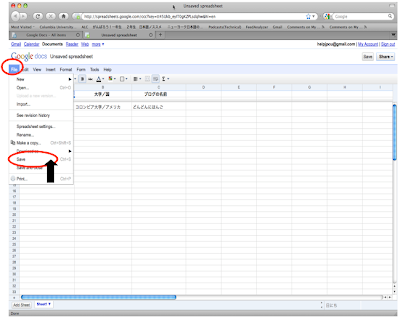
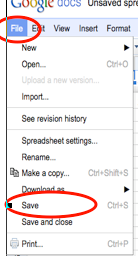
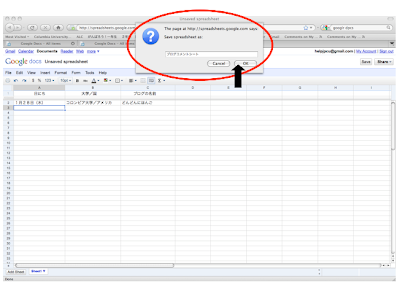
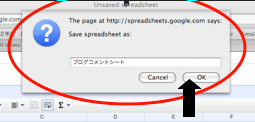
5. Save the file as "Blog Comment Sheet" and click OK.
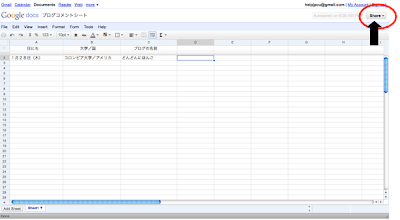
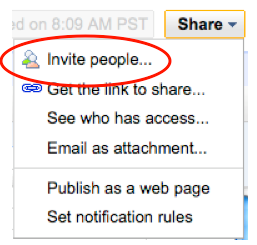
6. Next, click on "Share" on the upper right-hand side, and click on "Invite People."
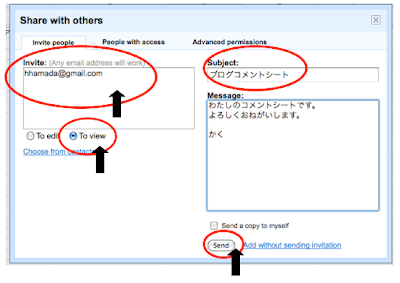
7. For the invite, type in the email address of the professor.
Then, click "To View."
Finally, click on "Send."
Nazikian-sensei:fumiko.nazikian@gmail.com
Park-sensei: parkjisuk3@gmail.com
Hamada-sensei: hhamada@gmail.com
Matsui-sensei: kml2168@columbia.edu
Sato-sensei: ss903columbia@gmail.com
8. Next, click on "Google Docs" on the upper-left hand side.
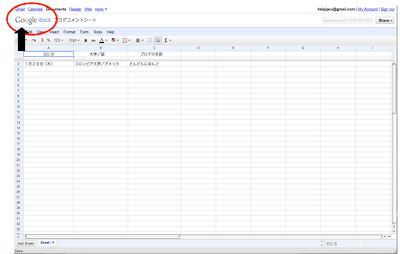
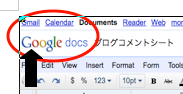
9. The "Blog Comment Sheet" from step 5 is in the folder.
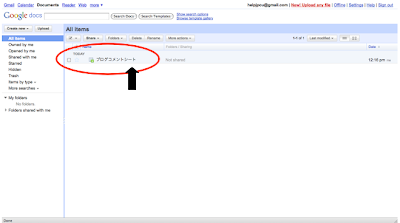
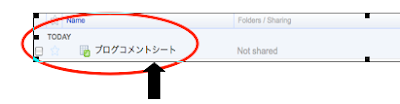
(http://docs.google.com)
On the login page, type in your gmail address and password.

2. Click on "Create New" on the upper left-hand side of the screen.

Click on "Spreadsheet" under the "Create New" menu.

3. Using the spreadsheet, make a comment sheet as shown below.


4. Next, click on "File" on the upper left-hand side, and save.


5. Save the file as "Blog Comment Sheet" and click OK.


6. Next, click on "Share" on the upper right-hand side, and click on "Invite People."


7. For the invite, type in the email address of the professor.
Then, click "To View."
Finally, click on "Send."
Nazikian-sensei:fumiko.nazikian@gmail.com
Park-sensei: parkjisuk3@gmail.com
Hamada-sensei: hhamada@gmail.com
Matsui-sensei: kml2168@columbia.edu
Sato-sensei: ss903columbia@gmail.com

8. Next, click on "Google Docs" on the upper-left hand side.


9. The "Blog Comment Sheet" from step 5 is in the folder.


Tuesday, September 21, 2010

Friday, September 17, 2010
Have you encountered with issues on leaving comments?
Recently, some people have encountered with issues on leaving comments when using Blogger. Their problems were that they could not leave any comments, or there were also times that their published comments somehow disappeared completely from the blogs.
In order to avoid these issues, it is strongly recommended that you change your comment box to the pop-up style. Here are the steps on how to change your comment setting.
1. Click "Design" located in the upper right-hand corner of your own blog page.
2. Click the "Settings" tab that is found in the upper left-hand corner of the screen.

3. Click "Comments" located in the upper-center area of the screen.
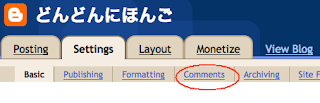
4. Check the "Pop-up window" option of "Comment Form Placement."

In order to avoid these issues, it is strongly recommended that you change your comment box to the pop-up style. Here are the steps on how to change your comment setting.
1. Click "Design" located in the upper right-hand corner of your own blog page.

3. Click "Comments" located in the upper-center area of the screen.

4. Check the "Pop-up window" option of "Comment Form Placement."

SAMURAI IN NEW YORK
SAMURAI IN NEW YORK: THE FIRST JAPANESE DELEGATION, 1860

Date: Jun 25 - Nov 7
Place: Museum of the City of New York
Museum of the City of New York
1220 Fifth Avenue at 103rd St.
New York, NY 10029
212.534.1672 Phone
Museum Hours
Tuesday - Sunday: 10:00 AM to 5:00 PM.
Closed Mondays (except holiday Mondays and May Mondays)
Thursday, September 16, 2010
Activities on September 20th
Today, complete exercises 1-4. (If you do not finish in class, finish at home). Those who have time, complete exercise 5 as well.
1. About the Blog Project (5 min.)
2. The Development of the Blog (15 min.)
3. Write a Self-Introduction in Japanese (30 min.)
5. Comment
1. About the Blog Project (5 min.)
- We will start a blog project today. First, start by reading the post titled “blog project”, which illustrates the purpose of this project. Scroll all the way down and you will see the entry titled “blog project”.
2. The Development of the Blog (15 min.)
- On this page, if you scroll down you will see the post titled: “How to Open a Blog Account.” Read this and develop your blog. If you have any questions, ask a nearby classmate any questions first, before asking the instructor.
- Once you have started your blog, send the blog’s URL address to your instructor. (Nazikian: fn2108@, Park: jp2194@, Hamada: hh2373@, Matsui: kml2168@, Sato: ss903@).
3. Write a Self-Introduction in Japanese (30 min.)
- In hiragana, write the first draft of your self-introduction. (Do not publish it online yet). For those who do not want to use their real names, it is also fine to use a pseudonym. For those who do not know how to type in Japanese, click on the “Japanese and Computer” link on the right-hand side of this page. If after reading the information you still have questions, first ask a classmate before asking the instructor.
- After writing your self-introduction, form groups of 2-3 students to peer edit your self-introduction. (Is your hiragana written correctly?) *If the hiragana appears too small on the page and is difficult to read, press the “Apple/command” key and the “+” key together, (PC users press the “Control” key instead of the “Apple/command” key) and the characters will get larger.
- After everyone in the group has read and corrected each others’ self-introductions, click “publish post” which then allows your post to be published.
- Write in English (or your native language) about why you chose to study Japanese, also include what you are excited about, and you find difficult after your first 2 weeks of class.
5. Comment
- Comment on your classmate’s blogs.
- Comment on the blogs of your fellow first year students in the United States. To see other school's blogs, click on the “せかい (world)” link under "ともだちをつくろう (Let's make friends)" on the right-hand side of this page. You can find three schools (including Columbia) under にほんご1ねんせい.
Subscribe to:
Posts (Atom)